
Best Workout App in 2026
Good workout apps differ in one thing above all: whether you decide your next weight or the app does. Ten gym and fitness apps compared on that, on what each free tier actually covers, and on price, plus where to look if you train at home or want a coach. Includes GymEvo, which we publish.
By Jobri Fitness
28 min read
Updated 2026-10-16
Which is the best workout app?
The best workout app depends on who you want deciding your next weight. Strong, Hevy, or Boostcamp if that is you: they log the session and stay out of the way. GymEvo, Jefit, Alpha Progression, or Fitbod if you want the app to propose the next set. Mesostrength, RP Hypertrophy, or JuggernautAI if you want a whole training block planned, at two to seven times the price.
We publish GymEvo, so read our pick as disclosed rather than neutral. What this page can do is say what each app decides for you, what its free tier covers, and what it costs, with the sources to check.
All ten are apps for strength training in a gym: sets, reps, weights, and the record of them. If what you want is a home workout, bodyweight workouts, HIIT sessions, or a personal trainer writing the workout plan, the home and coached apps section names the ones people usually mean instead. If what you want is running, cycling, yoga, classes, or a step count, none of these is the answer and a fitness platform like Apple Fitness+ or Strava is a different search. Free tiers get a paragraph each here; for the limits counted app by app, see what each free workout tracker covers.
The sections below name a pick for each way of training, then the tables compare all ten on what they decide, what they do at a plateau, the free tier, and price.
Best free workout app
GymEvo and Boostcamp. GymEvo's free tier logs unlimited workouts, shows your previous sets while you log, takes an RPE per set, holds a rep range and weight increment per exercise, and charts estimated 1RM and training volume over your whole history. Boostcamp's free side is a library of more than 11,000 programs, uncapped manual program building, and RPE and RIR logging. Hevy's free tier is a capable log that stops at four routines and three months of progress graphs.
On all three you apply double progression yourself, which is no hardship once you know the rule. The progression guide spells it out.
A free tier and a free trial are not the same purchase. GymEvo, Boostcamp, Hevy, Strong, Jefit, and Alpha Progression keep working after you stop paying. Fitbod, Mesostrength, and JuggernautAI advertise trial access instead, and RP Hypertrophy a 30-day money-back guarantee, so the app closes when the window does. If you want months rather than days, read the free tiers in the price table below, or the page that counts them one by one: free workout apps and what each free tier covers.
Best workout app for beginners
Boostcamp or GymEvo, depending on whether you want to be handed a program or build the habit first. Boostcamp's free library is the largest here, so you can follow a named coach program without deciding anything yourself. GymEvo's free tier gives you a library program too, and its Premium split generator writes one from your experience, equipment, and fitness goals if you would rather answer questions than browse.
Either way, the thing that decides your first six months is not the app. It is showing up and adding a little each week, which is what linear progression for beginners covers. If you want to see how a split is put together before you pick anything, GymEvo's workout planner shows the scheduling side and the plan generator builds one in the browser, free and without an account.
Best workout app for hypertrophy
Alpha Progression, RP Hypertrophy, and Mesostrength. All three plan in mesocycles, use RIR targets, and schedule a deload at the end of a block. RP Hypertrophy and Mesostrength also manage weekly sets per muscle group against volume landmarks. Alpha Progression Pro costs the least of the three.
Best workout app for a record of what you lifted
GymEvo, with a caveat about tiers. Progressive overload is only visible in hindsight, so the record an app keeps matters as much as the target it sets.
Free, GymEvo checks every set you log against every earlier set on that exercise and marks it when it beats your record for maximum weight, estimated 1RM, reps at that weight, or volume. The exercise's PRs tab shows the current record for each of those, and its charts plot estimated 1RM and total volume across any range up to your full history.
Premium opens the rest: the complete rep-record table, the personal-record history with the date and margin of every record, and the remaining progress tracking charts. Free, you see the first two rep records and your latest one, which tells you where you stand but not how you got there.
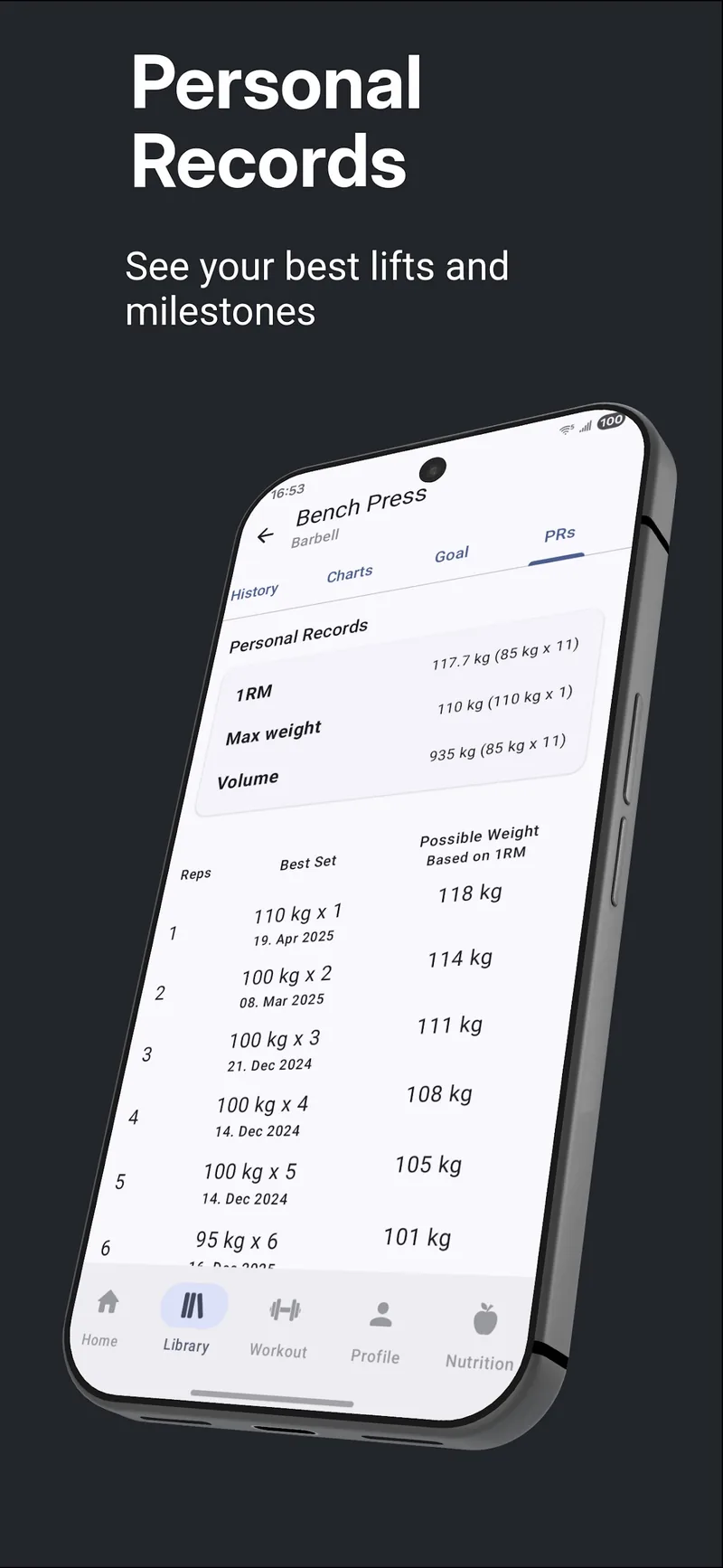 The PRs tab. Records per metric are free; the full rep-record table below them is part of Premium.
Best workout app for progressive overload
GymEvo, Jefit, Alpha Progression, Fitbod, and the three planning systems all suggest loads; the rule is what differs. GymEvo and Hevy's Trainer run double progression, Alpha Progression and Mesostrength work from RIR, JuggernautAI works from readiness you report, and RP Hypertrophy and Mesostrength manage weekly sets against volume landmarks. Which of those suits you is the whole question, and how load suggestion logic works below is the short version of each.
If you would rather apply the rule yourself in any of these apps, the progressive overload guide is the method and the calculator does the arithmetic.
Best workout app with calorie tracking built in
GymEvo. Food, macro, and bodyweight logging sit next to your sets, so training and nutrition are not two subscriptions. Every other app on this list leads with training, so check whether the one you pick expects a separate nutrition app beside it.
Best workout app for powerlifting
JuggernautAI. Built by Juggernaut Training Systems around the squat, bench press, and deadlift, it re-rates loads from the readiness feedback you give before, during, and after a session. At $34.99 a month it is also, alongside RP Hypertrophy, the most expensive plan here.
How we picked these apps, and what this page does not compare
Every app was scored on the same four criteria: what it decides about your next load and by which rule, what it does when you stall, what the free tier covers, and the standard annual price. Platforms are noted where a publisher names them, because a watch app is the kind of thing you find out about after paying. Competitor prices and free-tier limits were last reviewed on 12 September 2026, and we re-check them quarterly. GymEvo's own feature and tier claims were re-checked against the current app on 15 September 2026.
The same method produced the single-app pages behind this one, so you can check our work rather than take the summary: free workout tracker apps counts every free tier in full, and the Strong, Hevy, Fitbod, Jefit, and Alpha Progression pages each go through one app's progression rule, export format, and price in detail.
What this page does not do is rate the logging screens side by side. Doing that honestly means a month in each app, and we have not spent it, so nothing here claims one app is quicker or nicer to use than another. The single exception is a clearly labeled personal impression of Boostcamp's interface. Per-app details such as rest timers or watch support are quoted only where the publisher documents them. Nothing here measures differences in strength or muscle growth either, because feature documentation cannot.
If you train at home or want a coach, not a log
The ten apps above assume a gym and a barbell. If your training happens in a living room, or you want a person rather than a log, these are the apps people usually mean instead. They are not scored on the four criteria used above: we have not price-checked them on the same date or read their free tiers line by line, so treat this as routing rather than a verdict and check the current store listing before you subscribe.
Best workout app for home workouts and bodyweight workouts
- Nike Training Club decides the session. It is a free library of trainer-led sessions: home workout routines, bodyweight workouts, HIIT, mobility, and strength training, which suits a beginner fitness level and a flat with no equipment. It does not hold a working weight per exercise, so there is nothing in it to progressively overload.
- Sweat decides the whole workout plan for a block of weeks. Kayla Itsines' guided programs run in home and gym versions and are aimed at women: you follow the week rather than choose it.
- EvolveYou sits in the same bracket, with trainer-led programs for home or gym written for you week by week.
- iFIT decides the session and the machine. Its trainer-led classes control connected NordicTrack and ProForm equipment, so it makes sense if you already train at home on that hardware, or want its bodyweight and HIIT classes.
Best workout app with a personal trainer
- Caliber pairs you with a remote coach. Certified personal trainers write the workout plan, look at what you logged, and change it, which is a different product from an algorithm proposing a weight.
- Future is the same idea at the expensive end: one-to-one remote coaching with regular check-ins, priced like a person rather than like software.
- Ladder sells coached strength training programs run in small teams, which is the lever it uses to help people stay motivated, since everyone on a program trains the same week.
If you want a free gym log and nothing else
FitNotes is the minimal answer on Android: a free workout log with a routine planner and progress tracking charts, no subscription, no load suggestions, and no nutrition and meal plans. If the ten apps above feel like more product than you want, look at it before paying for anything.
Check one thing across all of these before comparing prices: whether nutrition and meal plans are part of the subscription or a second purchase. And once you want a specific weight on a specific bar, what each app decides for you is the table to read next.
How load suggestion logic works across apps
An app that advertises progressive overload is running one of a handful of rules underneath, and most are a variation on double progression. Knowing which rule an app uses tells you more than its feature list. Each term below links to the full explanation rather than repeating it here.
Double progression. Hold the weight and add reps inside a rep range, then add load and drop back to the bottom of the range. It is the default in most hypertrophy apps because it works with coarse dumbbell increments as well as fine barbell loading. How to keep progressing as an intermediate lifter covers the rep ranges and the jump sizes.
Linear progression. Add a fixed amount every session for as long as that keeps working. Beginners get months out of it on the squat, bench press, and deadlift; it runs out much sooner on small isolation lifts. Linear progression for beginners explains when to move on.
RIR (reps in reserve). How many more reps you could have completed. An app that asks for RIR measures effort instead of assuming it. Measuring training intensity compares the scales.
RPE (rate of perceived exertion). The same idea on a 1 to 10 scale, where RPE 8 is roughly 2 RIR. The RPE scale explains what each number means.
Percentage of one rep max (1RM). Loads prescribed as a share of your one rep max, usually an estimate rather than a tested single. The one rep max calculator gives you the estimate.
Training volume and volume landmarks. Volume here means hard sets per muscle group per week, and Renaissance Periodization's MEV, MAV, and MRV landmarks turn that count into a range to climb through and then deload from. How many sets per week gives usable numbers.
Mesocycle planning. A block of roughly four to six weeks that builds volume or load and ends in a deload. Periodization and deload weeks cover the structure.
The SAID principle. Specific Adaptation to Imposed Demands: you adapt to the demand you actually impose, which is why an app's rep ranges should match what you are training for. Hypertrophy vs. strength covers the split.
AI workouts. The label several publishers use for a generated session or a generated workout plan. Fitbod builds the session, GymEvo's Premium split generator builds the split, and JuggernautAI re-rates loads from readiness feedback. What you are buying in each case is a rule applied to your history, not an opinion, so judge AI workouts on the rule above rather than on the acronym.
What each app decides for you
A next-weight recommendation, a generated workout, and a planned training cycle solve different problems. This is the axis that separates ten apps which otherwise look alike in the store.
| App | Load suggestion logic | A good fit when you want |
|---|---|---|
| GymEvo | Free: rep range and weight increment per exercise, previous sets and RPE while you log. Premium: automatic per-set weight and rep targets on a double progression rule, adjusted by an optional energy check, and weights from your 1RM in percentage-based plans | Your own routine with the progression rule attached to each exercise, and calorie logging in the same app |
| Hevy | Pro Trainer generates editable programs and raises working weights once all prescribed sets hit the top of the rep range | A generated plan at a low subscription price |
| Strong | Logging, history, and PRO charts; automatic load recommendations are not listed in the reviewed feature documentation | Keeping an established gym log and workout history |
| Boostcamp | Advertises performance-based load progression alongside its free program library; free RPE and RIR logging | Ready-made programs or manual custom program building |
| Jefit | Describes load increases, holds, and deloads informed by performance and effort, so the rule runs downward as well as up; also documents exercise goals | Effort-aware guidance and exercise goal tracking |
| Alpha Progression | Pro recommends weight and reps for each set using RIR, with mesocycle and deload planning | Detailed planning around effort, periodization, and deloads |
| Fitbod | Generates the session itself and recommends sets, reps, and weights per muscle group | Help choosing the session as well as its loads |
| JuggernautAI | Readiness Rating System adjusts loads pre-session, intra-session, and from week to week and block to block | Powerlifting programming for the squat, bench press, and deadlift |
| Mesostrength | Automates the call between adding weight, adding reps, or holding, with RIR targets that tighten across a mesocycle and weekly sets managed against volume landmarks | Hypertrophy programming with visible volume and overload trends |
| RP Hypertrophy | Week-by-week mesocycle progression that adapts to your pump, soreness, and workload feedback, with a Meso Builder for customization | Renaissance Periodization's volume landmark method in app form |
Sources: Hevy Trainer, Strong PRO, Boostcamp, Jefit's progression system, Alpha Progression Pro, Fitbod, JuggernautAI, Mesostrength, and the RP Hypertrophy app.
Jefit describes an engine that can increase, hold, or reduce load. That is worth comparing, but a detailed description is not evidence that its recommendations outperform anything else here. Its public pricing table does not clearly identify which tier the engine belongs to, so check that in the app. Jefit's engine explanation, membership plans.
The three most expensive entries are systems rather than logs. JuggernautAI is aimed at competitive weightlifting and powerlifting and asks for readiness and effort feedback at several points in a session. Mesostrength and RP Hypertrophy come from the bodybuilding side and organize training as a mesocycle of rising volume. All three decide more for you than a gym log does.
Platforms matter if you log from a watch. GymEvo, Hevy, Jefit, Alpha Progression, JuggernautAI, and Mesostrength all publish iOS and Android apps. Hevy is the broadest: iOS, Android, Apple Watch, Wear OS, and a desktop view of routines and progress graphs. Strong lists iPhone, Android, and Apple Watch, with no Wear OS app named on its site. Mesostrength also runs in a browser. RP Hypertrophy ships on iOS and the web, with Android listed as coming soon.
What each app does when you hit a training plateau
A plateau is where these apps actually differ. The upward half of double progression is easy to automate. Deciding to hold or reduce load is not.
- Jefit documents holds and deloads as part of the same engine that raises load, so a bad session can reduce the next prescription rather than only delaying it.
- Alpha Progression plans deloads inside the mesocycle rather than waiting for a stall, and uses RIR to notice when sets cost more than they should.
- Mesostrength and RP Hypertrophy treat a stall as a volume problem first: weekly sets per muscle group climb toward maximum recoverable volume, then reset with a deload week.
- JuggernautAI recalibrates from the readiness and effort you report rather than from the calendar.
- GymEvo expects you to plan the variation. An exercise's targets can change week by week, from your own numbers or a premade linear, reverse linear, weekly undulating, or 5x5 cycle, and any workout has a deload switch. Its automatic targets, a Premium feature, can also be told to ease off: answer the pre-workout energy check with "tired" and it adds no reps to the next target.
- Strong and Hevy leave the call to you outside of Hevy's Trainer programs, which is fine if you know what you are looking at. Boostcamp advertises performance-based progression but documents no specific plateau behavior.
No app diagnoses why a lift stalled. Sleep, food, a change of gym, and accumulated fatigue all produce the same flat line. Why your lifts stopped progressing walks through the diagnosis before you change the program.
What GymEvo does, free and paid
You can run your training in GymEvo without paying, and the free tier is where progressive overload actually happens: the rep range, the increment, the previous sets, and the log. What Premium sells is automation and depth of analysis. The screenshots below are from the GymEvo app itself.
Free:
- Plan it yourself. Use a free library program or build your own workouts and splits, up to two custom splits and five custom workouts.
- Give each exercise its own rule. Your squat can carry a lower rep range and a larger weight increment than your lateral raise, which matters because plate loading and dumbbell steps are different sizes. The setting lives on the exercise inside your plan.
- See what you did last time. Previous sets sit next to the set you are logging, with an RPE field per set. That is everything double progression needs.
- Chart the two numbers that answer the question. Estimated 1RM and total volume per exercise, over one month, three months, a year, or your whole history.
- Keep your records. Every set is compared against every earlier set on that exercise and marked when it beats your record for weight, estimated 1RM, reps at that weight, or volume. Timed exercises use seconds in place of reps.
- Train and eat in one place. Calories, macros, barcode scanning, custom foods, bodyweight history, and a gain, loss, or maintenance target.
- Take your data out, or bring it in. CSV export of workouts, bodyweight, achieved goals, and food logs at any time. One history import per account reads a CSV export from Strong, Hevy, or Alpha Progression.
Premium, listed at $6.99 monthly or $44.99 annually:
- Automatic per-set weight and rep targets, with the optional energy check, and weights from your 1RM in percentage-based plans.
- The complete personal-record history and the full rep-record table.
- The remaining progress charts, plus weekly and monthly reviews.
- An AI-generated split, GymEvo's Premium splits and workouts, and unlimited custom splits, workouts, and exercise goals.
- Warm-up sets, the plate calculator, custom meals, AI calorie estimates from a meal photo or a spoken description, and the full recipe catalog.
Neither the free app nor Premium shows ads. The free versus Premium breakdown lists both sides in full.
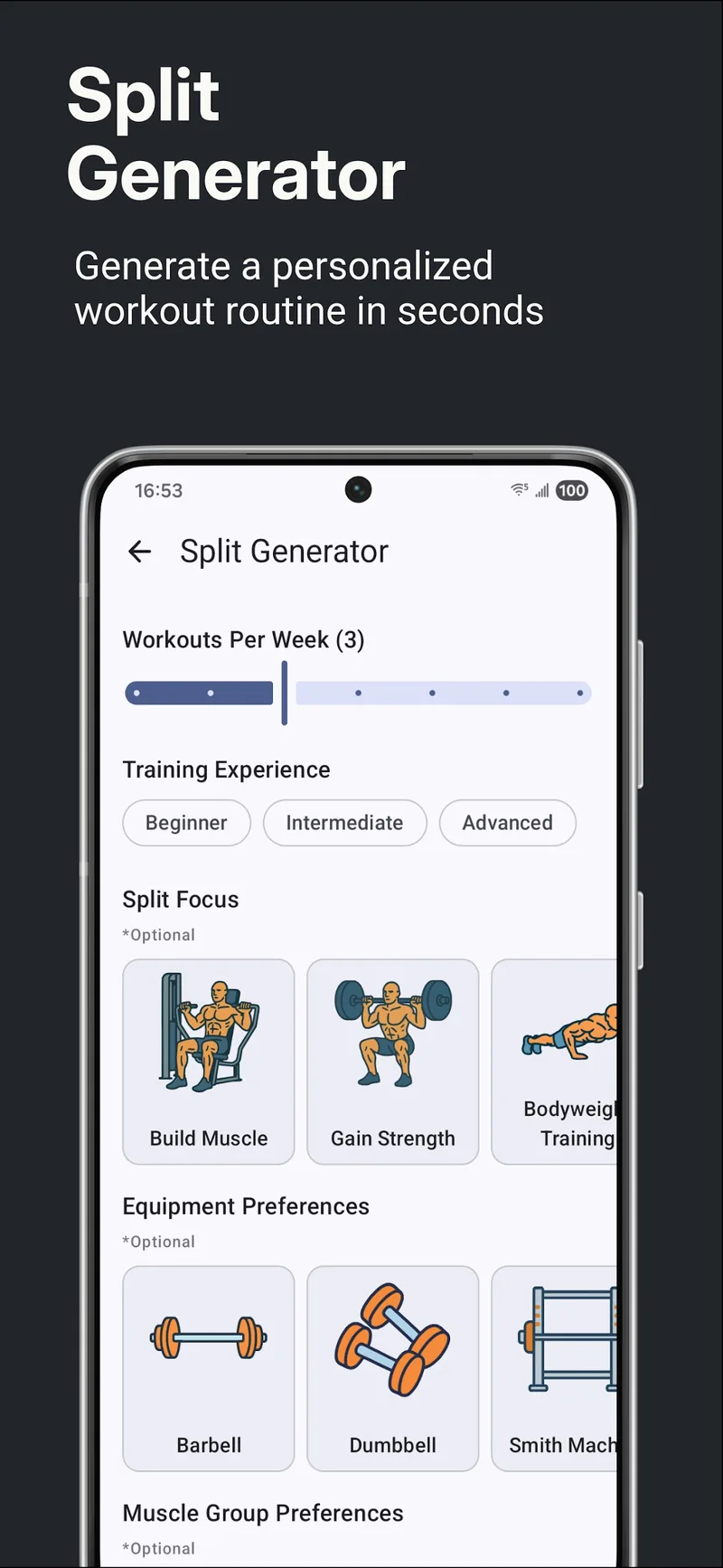 The split generator builds a plan from your inputs. It is a Premium feature.
How GymEvo's automatic progression works
Premium's automatic progression is double progression, worked out per set before you start. You give the exercise a rep range and a weight increment, and the app does the rest from your history.
It starts from your last session on that exercise and adds one rep to the set with the lowest estimated 1RM, which is usually the set that fell off. The weight only moves when every set sharing a rep range has reached the top of that range and at least one has passed it. Then the target weight goes up by your increment and the reps drop back to the bottom of the range.
The optional energy check changes both halves of that. Say you feel tired and it adds no reps at all. Say you feel good and it adds two, comparing against the better of your last two sessions; say great and it adds three and looks back three sessions. It is a self-report before you train, not a measurement of recovery, and you can ignore the question entirely.
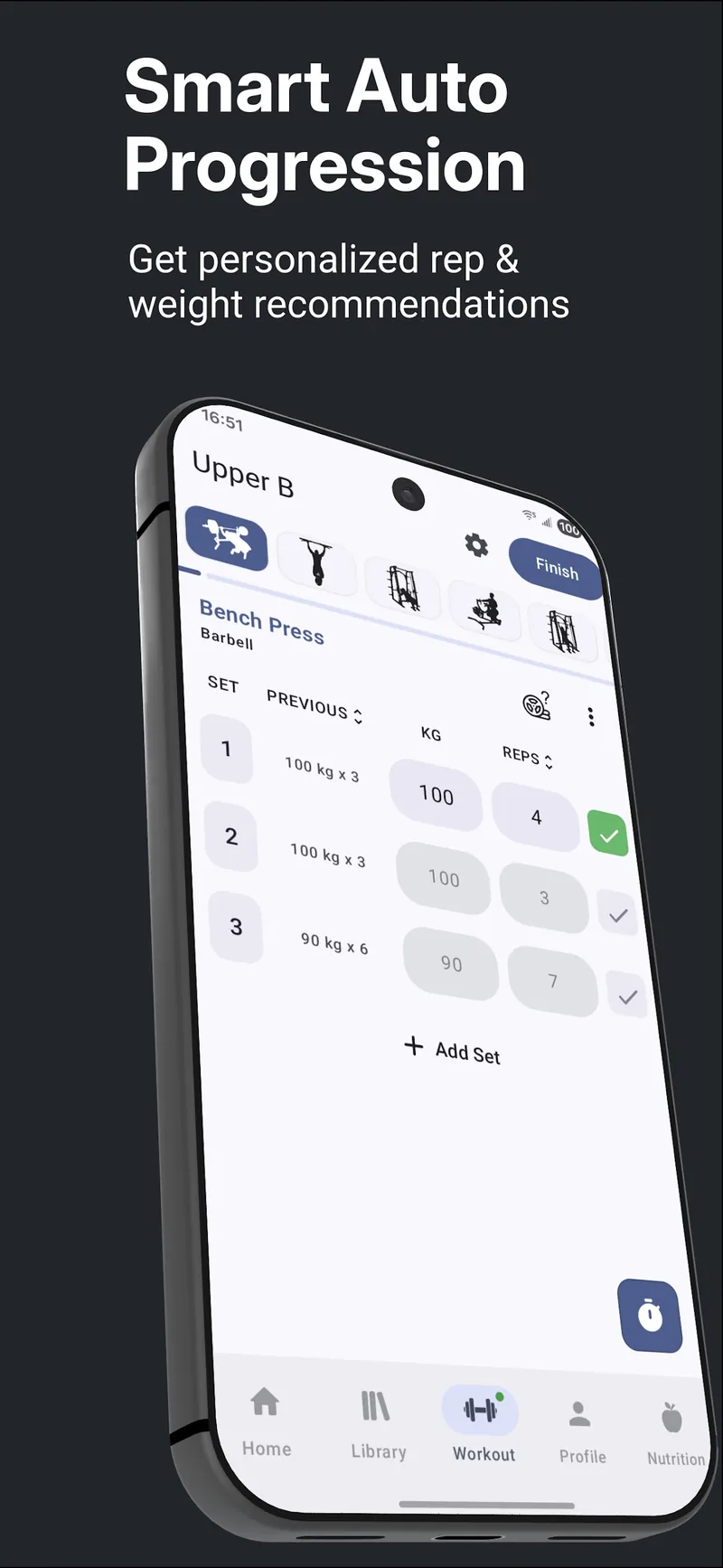 Targets appear per set, next to what you did last time.
That trigger for adding weight is close to Hevy's documented Trainer rule, which also waits until all prescribed sets reach the top of the range. The difference is what happens in between: GymEvo puts the extra rep on your weakest set rather than asking for more everywhere at once, and the energy check can hold the whole thing still.
Nothing about the rule is hidden, and you do not need Premium to use it. With automatic progression off, the free app still shows your previous sets and your rep range, so you can apply the same rule by eye. The progressive overload calculator runs the arithmetic for one exercise if you want to see the next few targets in advance.
Exercise goals and personal records
An exercise goal is a milestone you set for one lift, such as 10 bodyweight pull-ups or a 60-second plank. GymEvo shows current and achieved goals and tells you when you reach one. Two goals at a time are free; Premium removes the cap.
Records work at set level. When a logged set beats everything you have done on that exercise, it is marked as a record for maximum weight, estimated 1RM, reps at that weight, or volume, whichever applies. Your first session on an exercise sets baselines rather than records. Records are kept per exercise, so a dumbbell press and a machine press keep their own. The estimated 1RM uses the Brzycki formula, adjusted by the RPE you log, which is why an RPE 7 set and an all-out set at the same weight and reps are not treated as equal.
The tiers matter here, because this is where GymEvo asks for money: the current record per metric is free, while the full rep-record table and the dated personal-record history open with Premium. The free versus Premium breakdown has the row-by-row split.
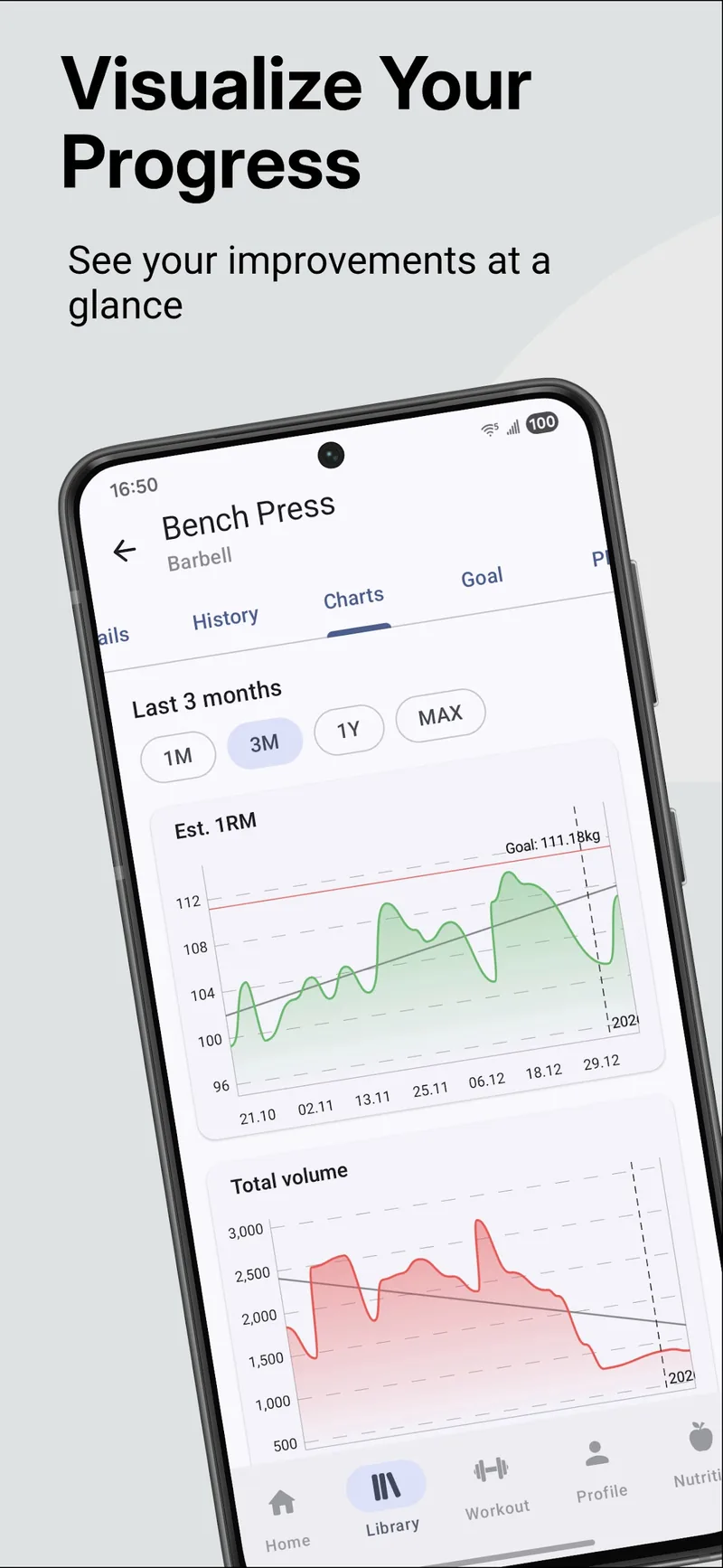 Estimated 1RM and total volume, over any range including your whole history. Both charts are free.
A session target says what to attempt today. An exercise goal gives those sessions a direction. A record says what you have already done. What counts as a personal record explains which of them are worth acting on.
Exercise goals are not unique to GymEvo: Jefit documents goals for individual exercises too. When you compare apps, look for a goal you can choose and follow over time, next to the workout prescription and the record history.
See everything GymEvo includes.
Price and free features
Prices below are published US-dollar website or US iOS App Store prices, checked on 12 September 2026. They are standard recurring prices and exclude introductory discounts. Prices and trial eligibility differ by platform, region, and offer. For the free tiers on their own, see what each free workout tracker covers.
| App | Paid monthly plan | Paid annual plan | Free tier and free trial |
|---|---|---|---|
| GymEvo | $6.99 | $44.99 | Unlimited logging; 2 custom splits, 5 custom workouts, 2 exercise goals; estimated 1RM and volume charts; records per metric; food and bodyweight logging; CSV export, plus one history import from Strong, Hevy, or Alpha Progression |
| Hevy | $2.99 | $23.99 | 4 routines, 7 custom exercises, progress graphs up to 3 months |
| Strong | $4.99 | $29.99 | Unlimited workout logs, 3 custom routines; full charts require PRO |
| Boostcamp | $14.99 | $59.99 | 11,000+ free programs, logging, uncapped manual custom program building; advertises free progression |
| Jefit | $12.99 | $69.99 | Custom routines, exercise library, logging and history |
| Alpha Progression | $12.99 | $79.99 | Logging and exercise library; recommendations require Pro |
| Fitbod | $15.99 | $95.99 | Trial access; no ongoing free training tier advertised |
| Mesostrength | $19.00 (Core) | $171.00 (Core) | No free tier; 14-day trial without a card |
| RP Hypertrophy | $34.99 | $299.99 | No free tier; 30-day money-back guarantee |
| JuggernautAI | $34.99 | $349.99 | No free tier; 2-week trial |
Price sources: GymEvo App Store, Hevy Trainer, Strong App Store, Boostcamp Pro, Jefit Elite, Alpha Progression, Fitbod FAQ, Mesostrength, RP Hypertrophy, and JuggernautAI. Hevy's free-tier limits concern graph access, not deletion of older workouts. Mesostrength's annual figure is its advertised 25% saving on the $19 Core plan; its Pro tier is $29 monthly.
Hevy advertises a $74.99 lifetime option. Strong's US listing also contains PRO Forever purchases, including $99.99, so lifetime access is not exclusive to Hevy. Check the offer available in your own app before comparing one-off costs.
Hevy Pro is the cheapest paid plan here and nothing on this page undercuts it. GymEvo Premium at $44.99 a year sits $35 under Alpha Progression Pro, $51 under Fitbod, and $255 under RP Hypertrophy. Those gaps are arithmetic on listed prices, not evidence that the products are substitutes.
What the app store says about your data
Before you install any of these, read the App Privacy box on the App Store listing or the Data safety box on Google Play. Both stores make the publisher declare it, and the two lines worth your attention are "Data Linked to You", meaning data tied to your identity or account, and "Data Used to Track You", meaning data shared with third parties for advertising or measurement.
We do not copy those labels app by app onto this page on purpose. They are declared per release, change without notice, and can differ between the iOS and Android builds of the same app, so a table checked in September would be quietly wrong by December while the live listing takes seconds to read. What to look for:
- Whether your workouts and any health entries sit under Data Linked to You or only under Data Not Linked to You.
- Whether anything appears under Data Used to Track You. An ad-supported free tier is the usual reason for an entry there. GymEvo shows no ads.
- Whether the listing names Apple Health, if you want your sessions to appear next to the rest of your health data, and whether there is a Google Play build at all. GymEvo, Hevy, Strong, Jefit, Alpha Progression, JuggernautAI, and Mesostrength publish Android apps; RP Hypertrophy lists Android as coming soon.
For what GymEvo collects, why, and how to delete it, the privacy policy is the answer rather than a paraphrase of one.
Common questions
How do I progressive overload?
Give the muscle slightly more work over time than it is used to, and give it a way to recover from that work. In practice that means one of three changes on a given exercise: add weight, add reps within your rep range, or add a set. Double progression combines the first two: work from the bottom of the rep range to the top at a fixed weight, then add the smallest available increment and start again at the bottom. Small lifts move in reps because the plates are too coarse; big lifts move in weight. If nothing has moved for three or four weeks at the same effort, that is a plateau, not a bad session. Progressive overload: the complete guide has the full method, and the progressive overload calculator works out the next target for you.
What is the 3-3-3 rule in the gym?
The 3-3-3 rule is a minimal training template: three sessions a week, three compound movements per session, three sets of each. The usual picks are a squat pattern, a press, and a pull, so a session covers most major muscle groups in under an hour. The name is also used for a rotation of three strength days, three cardio days, and three recovery days, so check which version someone means. It is a structure for showing up consistently, not a progression rule, so you still decide how the load moves from week to week. The 3-3-3 rule explained.
Do I need a workout app at all?
No. A notebook works, and so does a spreadsheet. An app earns its place by removing friction: showing what you lifted last time without flipping pages, keeping the graphs current, and doing the rep-range and plate arithmetic while you are still catching your breath. If you already log reliably, the useful question is which of these ten suggests loads the way you want to train.
Are workout apps and fitness apps the same thing?
Not quite, and the difference matters when you are searching. The apps on this page are strength training apps: they hold your routine, record sets and reps, and track what you lifted over time. "Fitness app" is the wider label, and it also covers step counters, running and cycling trackers, class and streaming platforms, and health dashboards that read your watch. An app from one group rarely replaces one from the other, so decide which job you are hiring for first. If it is barbells and dumbbells, this list is the right one.
Are paid workout apps worth it?
It depends on which decision you are buying. Every paid tier here sells one of three things: caps lifted on a free tier, a program written for you, or a load decided for you. Caps are worth paying for only once you hit them. A written program is worth it if the alternative is not training, and $24 to $95 a year is cheap against that. A decided load is the one to think about, because you can apply the same rule yourself for free in most of these apps once you know it. The honest test is to name the decision you want to stop making, then check that the tier you are about to buy actually makes it.
Can I move my workout history to a new app?
Partly, and it depends on both ends. Strong, Hevy, and Alpha Progression all produce a CSV export of your logged workouts, so the file exists. Whether it can be read on arrival is the other half: Hevy documents importing a Strong CSV, and GymEvo imports Strong, Hevy, and Alpha Progression exports, once per account, matching each exercise name against its own library and letting you resolve the rest before anything is written. What no import recovers is the parts of a log with no equivalent in the destination app, which is why warm-up sets, distance entries, and loads the app cannot store as a weight are handled as exceptions rather than copied across. Export your history before you change anything, either way. The Strong, Hevy, and Alpha Progression pages have the steps for each file.
Choosing the best workout app for you
Start from the decision you want to hand over, not from the app:
| If you want | Try | Where it sits |
|---|---|---|
| A log that stays out of the way | Strong, Hevy | Free on both, inside their routine caps |
| Programs written by someone else, at no cost | Boostcamp | Free library |
| Your own routine with a progression rule per exercise | GymEvo | Free |
| Your next weight decided for you | GymEvo, Alpha Progression, Jefit | Paid; Jefit does not clearly document which tier |
| The session itself chosen for you | Fitbod | Paid, after trial access |
| A whole block planned around volume landmarks | Mesostrength, RP Hypertrophy | Paid, no ongoing free tier |
| Powerlifting programming from readiness feedback | JuggernautAI | Paid, no ongoing free tier |
| Training and calories in one app | GymEvo | Free |
Start with GymEvo if you want to keep the progression decision close while the app handles the bookkeeping, and if calorie logging in the same place is worth something to you. The free tier covers the workflow; Premium buys automatic targets and the deeper record. See what GymEvo includes.
Choose Boostcamp if free program access and uncapped manual program creation are the priorities. Its free offering is substantial, though exclusive programs and advanced analytics are paid. We tried the app and found the interface cluttered and unintuitive, which is one opinion rather than a documented limitation. Free and Pro features.
Compare Hevy and Strong if you mainly want a log and are happy running double progression from your own notes. Hevy adds Trainer programming with Pro at the lowest price here. Strong is worth keeping if its logging workflow suits you. Hevy alternatives, Strong alternatives.
Consider Alpha Progression, Jefit, or Fitbod when their planning approach matches what you need. Alpha Progression combines per-set recommendations with RIR and deload planning; Jefit describes effort-aware load adjustments; Fitbod generates the session, which you can then customize and save.
Pay for Mesostrength, RP Hypertrophy, or JuggernautAI only if you want the whole block planned. At $171 to $350 a year they are the expensive end of this list, and none has an ongoing free tier, so use the trial before the renewal date.
If you would rather make the load decisions yourself, the progression guide, calculator, and spreadsheet give you a rule to follow. An app earns its place by making that plan easier to follow and its results easier to read.
Bottom line
- Training and calories in one app: GymEvo, which we publish. The free tier runs the whole workflow; Premium is $44.99 a year for automatic targets and the full record.
- Best free: GymEvo or Boostcamp. Unlimited logging and calorie tracking on one, more than 11,000 programs on the other, and no trial clock on either.
- Beginners: Boostcamp's free program library, or GymEvo if you would rather answer a few questions and be handed a split.
- Hypertrophy: Alpha Progression Pro at $79.99 a year, the cheapest of the three apps that plan in mesocycles.
- Progressive overload: GymEvo or Hevy Pro at $23.99 a year. Both run double progression; Hevy is the lowest price on this page.
- Home workout or a personal trainer: Nike Training Club if you want free sessions to follow, Caliber or Ladder if you want a coach writing the plan.
- Powerlifting: JuggernautAI at $349.99 a year, the most expensive answer here and the only one built around readiness feedback.
The best workout app, then, is the one whose decision you actually want to hand over. Pick that first and the price sorts itself out.
Sources
- GymEvo free vs Premium features, Jobri Fitness (accessed 2026-09-07)
- GymEvo US App Store listing, Apple App Store (accessed 2026-09-07)
- Alpha Progression Pro subscription, Alpha Progression (accessed 2026-09-07)
- Fitbod FAQ and subscription prices, Fitbod (accessed 2026-09-07)
- Hevy Trainer, Hevy (accessed 2026-09-07)
- Hevy free tier and retained data after Pro, Hevy (accessed 2026-09-07)
- Strong US App Store listing, Apple App Store (accessed 2026-09-07)
- Strong PRO features and data access, Strong (accessed 2026-09-07)
- Strong features, Strong (accessed 2026-09-07)
- Boostcamp feature overview, Boostcamp (accessed 2026-09-07)
- Boostcamp Free and Pro plans, Boostcamp (accessed 2026-09-07)
- Jefit progression system, Jefit (accessed 2026-09-07)
- Jefit Load Progression Engine explanation, Jefit (accessed 2026-09-07)
- Jefit membership plans, Jefit (accessed 2026-09-07)
- Alpha Progression free and Pro features, Alpha Progression (accessed 2026-09-07)
- Fitbod feature overview, Fitbod (accessed 2026-09-07)
- Fitbod saved workouts and updated prescriptions, Fitbod (accessed 2026-09-07)
- Progressive overload in GymEvo, Jobri Fitness (accessed 2026-09-15)
- Exercise Goals: How to Set and Track Them In-App, Jefit (accessed 2026-09-07)
- How to track personal records, Jobri Fitness (accessed 2026-09-15)
- JuggernautAI features, pricing, and platforms, Juggernaut Training Systems (accessed 2026-09-12)
- JuggernautAI US App Store listing, Apple App Store (accessed 2026-09-12)
- Mesostrength features, pricing, and platforms, Mesostrength (accessed 2026-09-12)
- Best apps for progressive overload training, Mesostrength (accessed 2026-09-12)
- RP Hypertrophy app features, pricing, and platforms, Renaissance Periodization (accessed 2026-09-12)
- Training volume landmarks for muscle growth, Renaissance Periodization (accessed 2026-09-12)
- A beginner's guide to the 3-3-3 rule in the gym, Snap Fitness (accessed 2026-09-12)
- Hevy features and platforms, Hevy (accessed 2026-09-12)
- Jefit homepage and app downloads, Jefit (accessed 2026-09-12)
- Can I export my workout data?, Strong (accessed 2026-09-15)
- How to import Strong app CSV files and export your data in Hevy, Hevy (accessed 2026-09-15)
- GymEvo on Google Play, Google Play (accessed 2026-09-15)
- Nike Training Club, Nike
- Sweat, Sweat
- EvolveYou, EvolveYou
- iFIT, iFIT
- Caliber, Caliber (accessed 2026-09-29)
- Future, Future
- Ladder, Ladder
- FitNotes, FitNotes (accessed 2026-09-29)
- App privacy details on the App Store, Apple
- Google Play Data safety section, Google
- GymEvo privacy policy, Jobri Fitness
- GymEvo content plan, keyword ownership and roundup boundaries, Jobri Fitness (accessed 2026-09-15)
Keep reading


Start tracking your training
Download GymEvo and keep your workouts, nutrition, and progress in one place.